Can I redeem on the website?
No. Only the in-experience CODES tab.

How to redeem The Bizarre Journey codes: join the Bizarre Journey group, open the left CODES tab, paste, Redeem. Not roblox.com/redeem. Verified November 2026.
Join the group, left CODES tab, paste, Redeem.
~4 min read
How to redeem The Bizarre Journey codes: join the Bizarre Journey Roblox group, open Place 112453860991361, press the CODES tab on the left, paste one string into Enter Code, Redeem. Not roblox.com/redeem. Play.
| Step | Action |
|---|---|
| 1 | Join the Bizarre Journey community |
| 2 | Launch Place 112453860991361 |
| 3 | CODES tab on the left |
| 4 | Enter Code → Redeem |
Matched by build plan, shared topics, and guide progression — not random related links.
PGG: “Join the Bizarre Journey community first.” Destructoid: “Join the Bizarre Journey Roblox group.” GameRant skipped that line and only listed the in-game box. This wiki treats group join as required until an in-game redeem without the group is filmed.
The publisher is Bizarre Journey, group 441910786. Old A Bizarre Journey communities will not unlock these strings. If Redeem fails after a clean paste, leave the experience, confirm the group badge, and rejoin Place 112453860991361.
Both PGG and Destructoid put the button on the left of the screen. GameRant said “Codes button from the main menu.” Use the left tab first. If your HUD hides it behind another panel, close inventory and look at the left stack again.
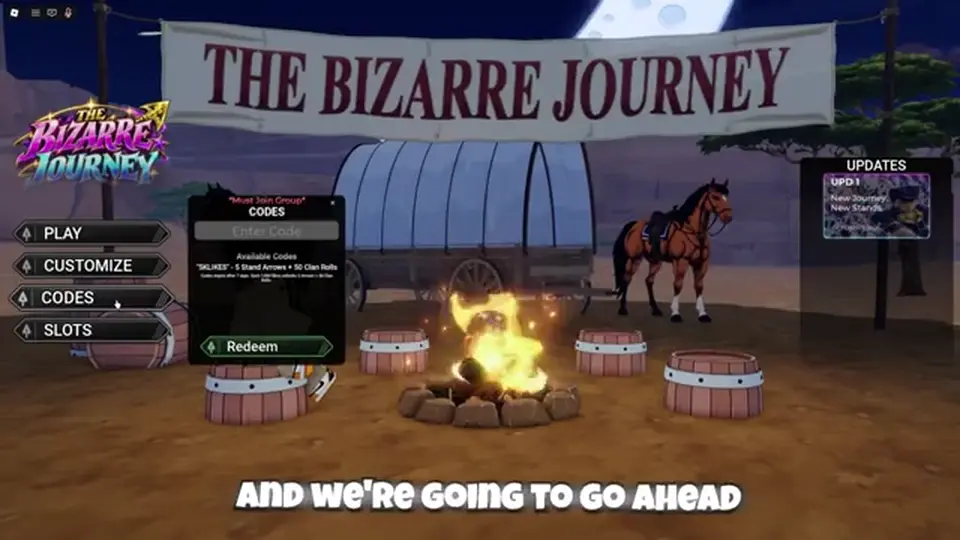
It is not the Roblox website redeem page. It is not a chat command. It is not a Discord bot. Typing a code in chat will not pay Stand Arrows. After the tab opens you should see an Enter Code field and a Redeem control.
Copy from the The Bizarre Journey codes Code column. On PC, click the field and paste. On mobile, long-press paste. Do not retype 2THOUSANDCCU from memory — that string is the one people misspell.
| Do | Don’t |
|---|---|
| Copy the Code cell | Type from a thumbnail |
| One string per Redeem | Paste three codes in one box |
| Match uppercase | Add spaces or [D4C] |
| Redeem, then next row | Paste the reward text |
Watch Stand Arrows and Clan Rolls. Active rows never name Yen. If inventory does not move, the string failed, you already used it, or you are on the wrong Place. A “success” toast without a count still needs an inventory check.
2THOUSANDCCU should jump arrows by 20 and Clan Rolls by 100 if the recap still holds. Then 4KLIKES and 2KLIKES add 5/50 each. If the fat row pays and a small row does not, keep the small row on a watch list — it may have expired between recaps.
The listing is a Roblox experience. Recaps do not publish a separate console path. Use the same left CODES tab. If a gamepad cannot paste, type carefully in the on-screen keyboard. Codes are case-sensitive.
You may still be on the loading screen, in a menu that covers HUD, or in a test place. Close extra menus. Confirm the experience title is The Bizarre Journey, not a fan uncopylocked copy. Then retry Redeem.
Walk the fail table. Then stop retrying Inactive rows from the archive. New strings: discord.com/invite/SVWYQTCvm6.
| Check | Pass looks like |
|---|---|
| Group | Member of 441910786 |
| Place | 112453860991361 |
| UI | Left CODES tab visible |
| String | Exact Active code |
| Account | Not already redeemed |
Peak CCU is when the left CODES tab fights other HUD. Close inventory. Close emote wheels. Look at the left stack. If you still cannot see CODES, you may be in a vehicle camera or a death screen — reset the character, then open the tab again. Do not type the string into chat while you wait.
On mobile, paste is the whole game. Long-press the field. If the keyboard eats a character, delete the field and paste again. 2THOUSANDCCU is the string people split into 2THOUSAND and CCU. One box, one Redeem, then the next row. Console players who cannot paste should type slowly and check the last four characters before Redeem.
After three Active rows, stop. A fourth paste is either an Inactive archive string or a fake from a thumbnail. Come back to The Bizarre Journey codes instead of inventing 5KLIKES. If Redeem paid, go play. If it did not, walk the fail table on this page once, then quit the loop.
Group membership can drop if you leave and rejoin Roblox on another account. Codes are per account. A sibling account needs its own group join and its own pastes. That is not a reason to share screenshots of working strings in random Discord DMs — the public table is enough.
Next: grab every remaining Active row on The Bizarre Journey codes.
No. Only the in-experience CODES tab.
After you can see the left HUD. Recaps do not document a loading-page box for this game.
Same publisher community. Join 441910786 either way.
Treat them as case-sensitive. Copy, do not retype.
Matched by build plan, shared topics, and guide progression — not random related links.